

Creative Direction
Visual references for commercial API workflows
These stills come from external IMA creative assets and are used here as art direction reference for image-led or campaign-style motion workflows.

Editorial Reference
Fashion Story Frame
A strong character-led still for image-to-video or editorial ad concepts. This is the kind of reference frame teams use when they want Kling to preserve styling, attitude, and product context.
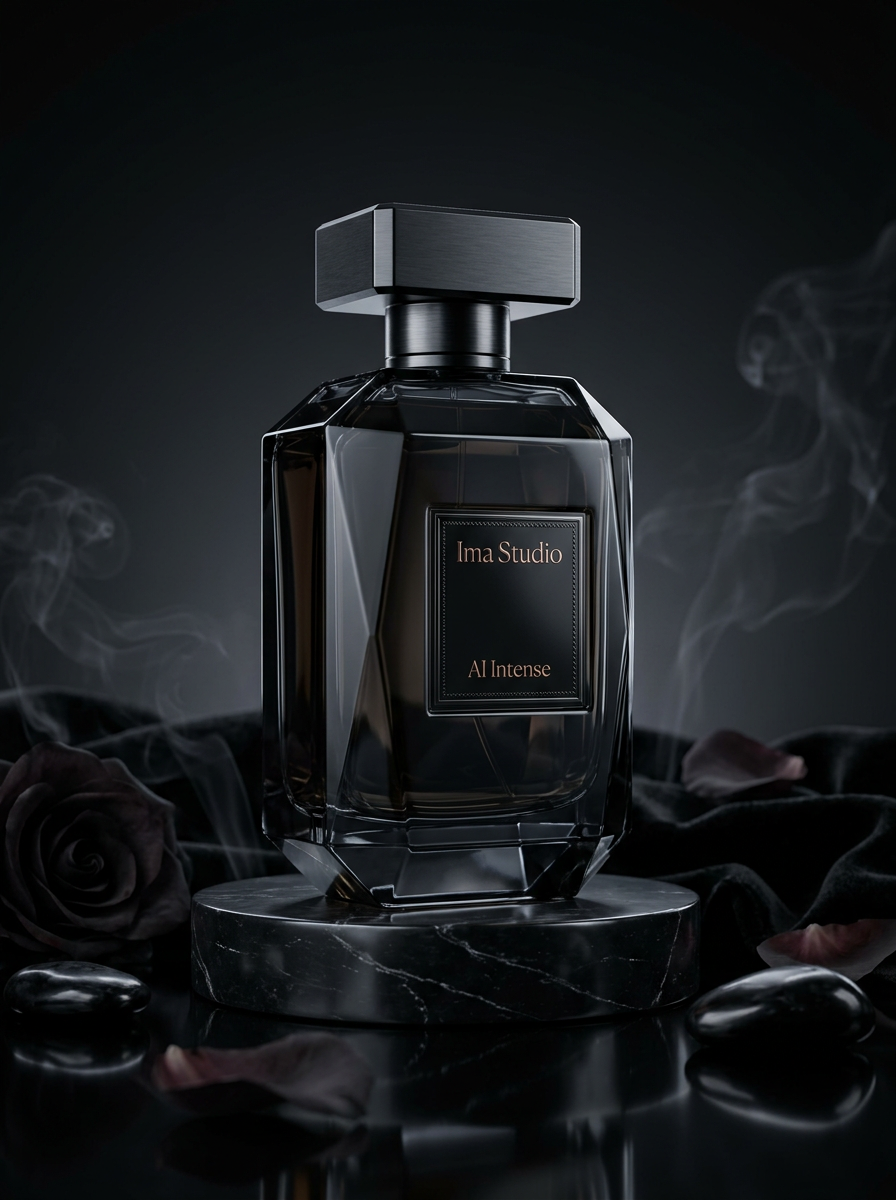
Product Atmosphere
Luxury Commercial Still
A premium product composition with controlled lighting, dark mood, and clean commercial staging. It maps well to Kling workflows for luxury product launches and cinematic brand spots.
Available Endpoints
Start building with the Kling AI API
Multiple endpoints for text-to-video, image-to-video, fast preview flows, and async job retrieval. This section is laid out more like a product catalog than raw docs so users can scan what to use first.
Endpoint
Text-to-Video Task
/v1/videos
Create a Kling text-to-video task by setting model to a supported Kling family id and passing prompt, duration, size, and optional metadata.mode.
Best for: Use this for prompt-led video generation when the workflow does not need a source image.
Endpoint
Image-to-Video Task
/v1/videos
Create a Kling image-guided task by passing image for the first frame and optionally metadata.image_tail for the last frame under the same public request shape.
Best for: Useful when the task should start from an approved reference frame or interpolate between first and last frame states.
Endpoint
Task Status
/v1/videos/{task_id}
Poll a submitted Kling task until it completes, then read the hosted output URL from the completed task payload.
Best for: Needed for production apps that queue tasks, surface progress states, and persist completed outputs after task completion.
Get started today
Ready to integrate Kling AI?
Try the API directly in the console, or reach out to the team for onboarding, pricing, and enterprise setup.
API Documentation
How to get access to Kling AI API
Kling on ImaRouter follows the unified public video task flow: submit to /v1/videos with the chosen Kling model and vendor parameters, then poll /v1/videos/{task_id} until the result is ready.
const apiKey = process.env.IMAROUTER_API_KEY;

async function createKlingVideo() {
  const createResponse = await fetch("https://api.imarouter.com/v1/videos", {
    method: "POST",
    headers: {
      "Authorization": `Bearer ${apiKey}`,
      "Content-Type": "application/json"
    },
    body: JSON.stringify({
      model: "kling-v2-6",
      prompt: "Luxury watch campaign, dramatic studio lighting, smooth dolly move, premium motion design feel",
      duration: 10,
      size: "16:9",
      metadata: {
        mode: "pro"
      }
    })
  });

  const task = await createResponse.json();

  let status = "";
  while (status !== "completed") {
    await new Promise((resolve) => setTimeout(resolve, 3000));

    const statusResponse = await fetch(`https://api.imarouter.com/v1/videos/${task.task_id ?? task.id}`, {
      headers: {
        "Authorization": `Bearer ${apiKey}`
      }
    });

    const taskState = await statusResponse.json();
    status = taskState.status;

    if (status === "failed") {
      throw new Error(taskState.error ?? "Kling generation failed");
    }

    if (status === "completed") {
      return taskState.metadata?.url ?? taskState.video?.url ?? taskState.output?.[0]?.url;
    }
  }
}
Async flow
- 1
Choose the Kling model first, then decide whether the task is prompt-led or image-guided.
- 2
Submit the task to /v1/videos with prompt, duration, size, and Kling metadata such as mode or image_tail.
- 3
Store the returned task id in your backend or hand it back to the frontend for polling.
- 4
Poll /v1/videos/{task_id} until the task completes, then persist the hosted output URL in your own storage flow.
What Makes It Different
What makes the Kling AI API different
This section is laid out to read more like a product narrative than a feature list. Each row shows a capability, why it matters, and what that looks like in a real workflow.
Current Kling family in one public request shape
That lets product teams evolve their Kling offering without rebuilding the transport layer whenever the preferred model changes.
Capability
Current Kling family in one public request shape
The public docs expose multiple Kling generations under the same task shape: kling-v1, kling-v1-6, kling-v2-master, kling-v2-1-master, kling-v2-5-turbo, kling-v2-6, and kling-video-o1.
That lets product teams evolve their Kling offering without rebuilding the transport layer whenever the preferred model changes.
Example scenario
A multimodel video app starts with kling-v2-5-turbo, then promotes kling-v2-6 later using the same public task schema.
Capability
Image tail for first-last-frame control
Kling's public request shape explicitly exposes metadata.image_tail for workflows that should interpolate between a first frame and a last frame.
This is more useful than a plain single-image run when the product needs stronger control over where the shot ends.
Example scenario
A creative workflow starts from a product hero image and specifies a shelf-ready last frame so the motion lands on a controlled final composition.
Image tail for first-last-frame control
This is more useful than a plain single-image run when the product needs stronger control over where the shot ends.
std/pro quality mode remains available
That makes it easier to expose a simple quality toggle in the product while still using the unified public task interface.
Capability
std/pro quality mode remains available
The docs keep Kling quality selection in metadata.mode, where applicable, instead of hiding it behind a provider-native branch.
That makes it easier to expose a simple quality toggle in the product while still using the unified public task interface.
Example scenario
A frontend offers standard and pro presets that both submit to /v1/videos, only changing metadata.mode under the hood.
Capability
Aspect ratio is explicit and stable
Kling's public request shape treats size as aspect ratio with explicit supported values of 1:1, 16:9, and 9:16.
That makes mobile-first and widescreen workflows easier to validate before a task is ever submitted.
Example scenario
A social tool routes portrait clips into 9:16 and campaign clips into 16:9 using the same backend path.
Aspect ratio is explicit and stable
That makes mobile-first and widescreen workflows easier to validate before a task is ever submitted.
Unified API Platform
Two API tiers for different use cases
Pick the right balance of quality, speed, and cost for your workflow. The section stays data-driven, but the presentation is closer to a clean product comparison table.
| Feature | Legacy + early v2 | Current mainline KlingRecommended | kling-video-o1 |
|---|---|---|---|
| Best for | Compatibility and older model coverage | Most current general Kling workflows | Specialized routed Kling workflows |
| Speed | Async task flow | Async task flow | Async task flow |
| Quality | Baseline to intermediate Kling capability | Current mainstream Kling generation path | Specialized alternative inside the Kling family |
| Cost | Task-based | Task-based | Task-based |
| Recommended use | Use kling-v1, kling-v1-6, or kling-v2-master when the product still needs those older request targets. | Use kling-v2-1-master, kling-v2-5-turbo, or kling-v2-6 for current-generation prompt-led and image-guided flows. | Use kling-video-o1 when your team wants that specific routed Kling target under the same request contract. |
| API endpoints | /v1/videos | /v1/videos | /v1/videos, /v1/videos/{task_id} |
Use Cases
Industries using the Kling AI API
This section keeps the same reusable data model, but the presentation is closer to a grid of industry cards instead of long narrative boxes.
Creative apps and ad-generation products
Prompt-led cinematic clips
Generate short-form clips from text prompts while keeping aspect ratio and quality mode explicit in the same public task shape.
Kling is useful here because it gives teams a familiar public task contract without forcing a provider-specific endpoint split.
Brand teams and product storytellers
First-last-frame motion control
Start from a known first frame, define a target last frame, and let Kling interpolate the motion between them.
metadata.image_tail makes the workflow materially more controlled than a plain single-image video prompt.
Mobile-first apps and campaign tools
Portrait and widescreen creative
Route social-first portrait output into 9:16 and campaign footage into 16:9 without changing the backend task model.
Because aspect ratio is explicit in size, the UI can remain intentional instead of relying on post-crop workarounds.
Ecommerce teams and growth studios
Image-guided ad generation
Upload product or campaign frames, then generate motion variants that preserve the visual start state more tightly than prompt-only generation.
This is useful when the source visual already matters and the product cannot tolerate too much subject drift.
Platform teams and multimodel builders
Model-routing video stacks
Keep Kling as one option inside a wider routed video platform without needing a one-off backend branch just for this family.
The value is consistency: the same /v1/videos task pattern can carry Kling alongside other routed video models.
Examples
Kling AI API examples
Prompt directions paired with visual reference frames. Use them as inspiration for landing pages, creator tooling, commercial mockups, or API playground defaults.
Luxury product launch
Prompt-led commercial direction
A useful Kling prompt example when the product needs a controlled cinematic launch feel without overcomplicating the request shape.
Luxury fragrance commercial, dark marble pedestal, smoke in the background, reflective glass edges, slow push-in, restrained camera drift, premium cinematic pacing

Fashion first-last-frame motion
Controlled image-guided transition
This is where metadata.image_tail is more useful than a plain single-image run because the end state matters to the final shot.
High-fashion editorial scene with a first frame focused on the standing pose and a final frame ending on the handbag close-up, measured camera tracking, premium fashion pacing

Consumer tech reveal
Hardware motion concept
A practical example for hardware launches where the main goal is a clean short-form motion concept rather than a complex story arc.
Premium consumer tech reveal, reflective surfaces, slow macro movement across hardware edges, clean studio background, subtle energy accents, launch-film polish
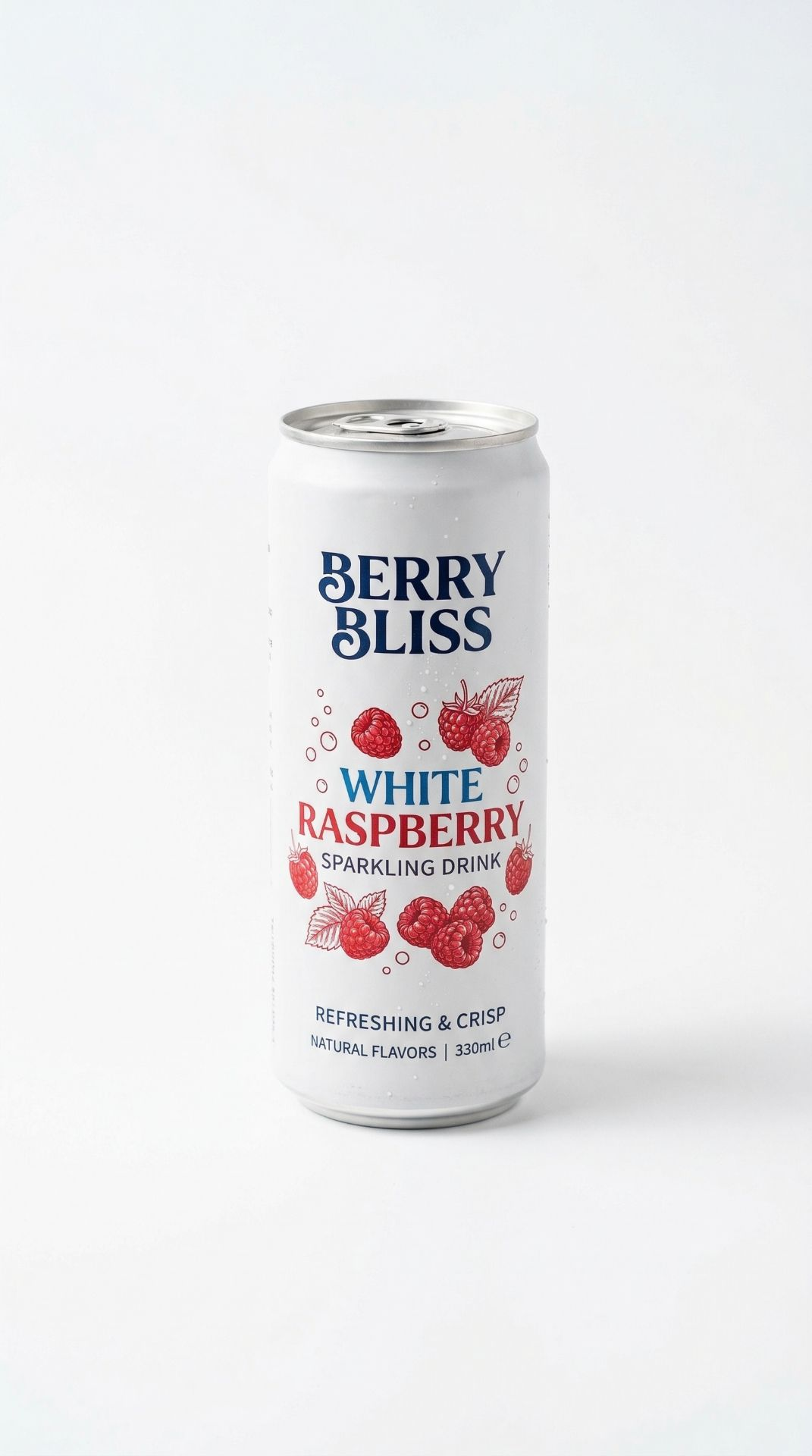
Splash-led beverage short
Energetic ad test
A strong prompt direction for short-form commercial output that needs product energy and clear motion without a larger multi-scene narrative.
Beverage commercial, can floating in a bright studio, fruit ingredient callouts, liquid splash transitions, tight product framing, crisp energetic motion
How To Use This API
How to use Kling AI API
This quick-start walkthrough is written to rank for integration-style searches while staying concise enough for busy developers and operators.
- 1
Choose the Kling model
Pick the Kling model variant that matches your current product target, such as kling-v2-5-turbo or kling-v2-6.
- 2
Set prompt-led or image-guided mode
Decide whether the task is pure text-to-video or whether it should start from a source image.
- 3
Configure aspect ratio and quality mode
Use size for 1:1, 16:9, or 9:16, and set metadata.mode when the chosen Kling target supports std or pro quality switching.
- 4
Add image_tail when the last frame matters
For first-last-frame workflows, send the starting image in image and the target final frame in metadata.image_tail.
- 5
Poll and persist the result
Use the returned task id to poll /v1/videos/{task_id}, then archive the hosted output URL once the task completes.
FAQ
Frequently asked questions about Kling AI API
FAQs stay compact and skimmable here. The content is still data-driven for SEO, but the layout is cleaner and less visually heavy.
What is Kling AI API?
Kling AI API on ImaRouter is the public async task interface for the current Kling model family, covering both prompt-led and image-guided video generation.
Does Kling support image-to-video?
Yes. Kling supports image-guided video generation, and the public task shape also supports metadata.image_tail for first-last-frame style control.
Which Kling models are supported?
The public docs list kling-v1, kling-v1-6, kling-v2-master, kling-v2-1-master, kling-v2-5-turbo, kling-v2-6, and kling-video-o1.
What endpoint does Kling use in ImaRouter?
Kling uses the public video task flow: submit on /v1/videos and poll on /v1/videos/{task_id}.
How do I control the last frame?
Use metadata.image_tail when the workflow needs an explicit last-frame image in addition to the first frame image.
How do aspect ratio and quality mode work?
Use size for aspect ratio values such as 1:1, 16:9, or 9:16. Use metadata.mode for std or pro quality mode where the model supports it.
What durations are supported?
The public Kling request shape supports 5-second and 10-second tasks.
How do I get the final video URL?
ImaRouter combines model routing, five-modality coverage, transparent pricing, automatic failover, and faster new-model onboarding so teams do not have to integrate and monitor providers one by one.
Why use ImaRouter for Kling instead of wiring every provider yourself?
It gives you one stable public task shape across the Kling family and fits naturally into a broader routed video platform, so you do not need to maintain a bespoke endpoint branch for each model target.
Model Directory
Browse the full model market before you choose your route.
Use the `/models` catalog to scan providers, modalities, reasoning support, context windows, and pricing metadata from a local OpenRouter snapshot. It is the fastest way to compare what exists before you decide which models should be prioritized on ImaRouter.
Get Started
Add Kling to your product without building a one-off provider integration
Use one /v1/videos task flow for the Kling family, then expand the same pattern across the rest of your routed video stack. Use one API surface for 200+ models across five modalities, with transparent routing, automatic failover, and fast new-model onboarding.